©Verte Photography All Rights Reserved

Showing posts with label Light. Show all posts

Friday, August 29, 2014

Function Friday: White Balance

Want to take better photos? Who doesn't?

Sometimes we find that our images have color casts that we don't understand, that are distracting.
By learning a little bit about light, and how your camera works you can make a simple adjustment and have a HUGE impact on your natural light images.

White Balance (WB) 
simply refers to the camera mode that allows you to control how your camera sees the color temperature of light. 
By selecting the correct mode - your camera can correct setting White - back to White and saving you countless hours of photo editing and stress! 


If you haven't already - you can print these Keycards and keep them in your camera bag for quick reference!
<Get the second set here>

This double use Key Card lists both the different WB modes and WHEN you want to use them along with a kelvin guide to the color temp / type of light. 
Your most natural light, is during midday - or when you are using flash or strobe lights. 
However, as a photographer you get to choose when utilizing your natural light environment adds to your images - and when it needs to be corrected out. 

This cutie was taken in the shade during the morning and you can see the blue behind her while blurred should be cement (grey) Personally I choose NOT to correct this with WB because it really makes her eyes pop. 


Where in this image I selected to utilise my WB to remove the cool blue tone because I felt it made her look too pale and it seemed to fight her personal style.

WB is absolutly your friend if you are doing portait work - but another BIG place to use it is product photography. If you are an online retailer doing your own images - this is a tip you want to use! 


Friday, April 11, 2014

The MagMod

Every now and then Kickstarter provides my family with a new toy. This time, I was lucky enough to have this little gem picked up for me as part of a gift. Introducing the MagMod.


When I first looked at it I thought... well that looks fun... but I don't know how often I would really bust that out to use.... and then I put it on my flash.

See, the first odd piece with the square cut out stretches to fit over your speed light. It has magnets in it that you can then literally SLAP on the honeycomb filter... or multiple honeycomb filters. This image shows the filter being held by the magnet - but not properly placed for use. (just to clarify)


Here is how it looks attached.

Now... there are times when I want to use my flash, but I don't want that harsh "flash" look... and this is a great option to break up that light. I haven't had a chance to test it on portraits but I think it would be a solid option. the part that has me dancing... like really moving and grooving and bouncing in my seat...  gel options.

While I don't use gel's in my photography as a general rule, it has mostly been due to a complete hatred of the thin plastic sheets and that they get torn or bent too easily. 


WHALLLLAH! Introducing hard plastic, easy to pop in and out gels that fit over my speed light! Slap on... slap off! It's MAGIC I tell you MAGIC! (Okay, really it's ingenuous... not magic but I LOVE it!)

Now the kit that I got came with 2 honey combs, and a variety of gels... red, yellow, blue, there's like 6 or 8 of them. you simply stretch the plastic away from the gel that is inside to pop one out and the other in. They are nice and flat and store easily in a pocket of my camera bag. Why oh why am I head over heals in love with this? Because, it means that I can use my speed light as my back-light, and be a little more creative and custom on backgrounds for clients.

Taking an image like this....
Which is perfectly acceptable... (and an amazing product made by Dragon Flight Dreams)

and make it a bit more special... like this.

In an instant.

As for new cool must have toys, I give this one two big thumbs up for my use. Is it a product everyone needs... of course not! That's what makes it FUN! 

Thursday, March 13, 2014

The Beauty of Light

Beauty can be seen in all things, seeing and composing the beauty is what separates the snapshot from the photograph. – Matt Hardy


 Technical know-how is not everything when it comes to photography. It is possible for anyone to take a snapshot... it is the few who can transcend that and create magic. Transporting you to a world beyond, creating art, telling the story, and capturing your attention. In today's fast paced, where images (and advertising) is everywhere... your brain is bambared with images.

 So what is it that grabs your attention? What set's images apart?

Completely stepping out of my wheel house this week, I have been talking a lot about age, and beauty and how we perceive ourselves and what we find attractive in others. I think this same rules apply to photography. What captures one persons attention is not always what another will enjoy, or even what we enjoy about ourselves. You can set two photographers down on the same street corner and each will utilize their eye, style, and camera showing you a different scene.

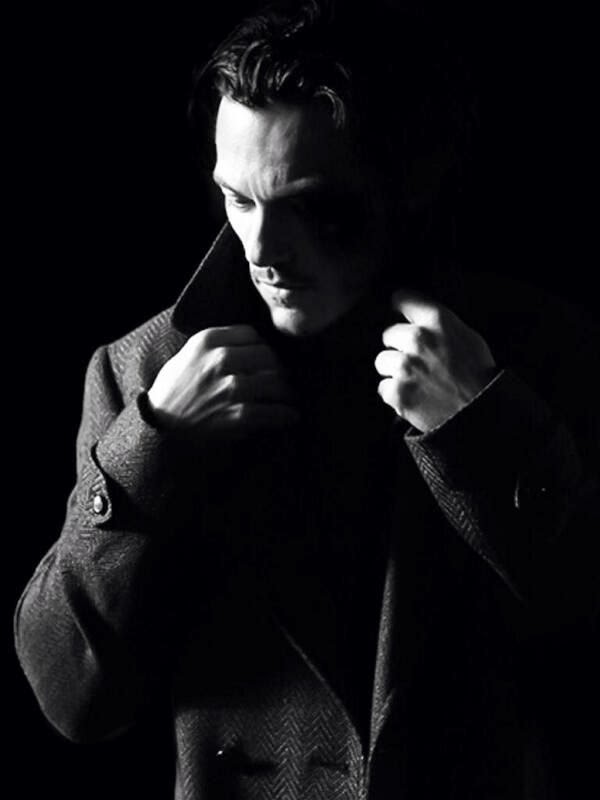
Personally, I think lighting is what first grabs me about a good image. It could be a beach photo, or a portrait... even product photography. If it has interesting light, or balanced light I look... it draws me in for a second glance.

http://littlehousecrafting.storenvy.com/


Let's take our good friend the "button" from Little House of Crafting. A bright red, simple button that is one of the hardest things to photography and grab your attention - because it's simple. Plus, it's incredibly hard to shoot because its red, small and reflective. Seriously... take photos of red things, its tough! But it is the prime of how to utilize your light to create interest and capture a simple beauty. The side lighting here catches on the rounded edges and creates a soft bracket effect on the subject matter. It creates a "pop". It also produces a solid black background so all you see is the subject.

Not a believer? The same effect is found here...
I wish I knew who to give photo credits to on this image! Please tell me!!!!
I wish I knew who to give photo credits to on this image  - Please tell me!
Yes! I totally know... it's my newest crush - I had this in the line of images from Tuesday's post but it fit so much better here! Besides, isn't your day better with a little bit of eye candy?

The same side lighting was used to highlight and drop other parts of the image to shadow, so your eye is draw to the subject the photographer wants to showcase. "POP"

Lighting is KEY for bringing beauty, and your subject to the forefront of your images!


Friday, February 21, 2014

Seeing the Light

The quality of your light, sets the mood for your images.


By knowing the type of light you are shooting in, you can change the mood and look of your images! Above you will note the warm, orange and yellow tones that really pop in this dry field of grass. That is because we took the shot about an hour before sunset when the light is the "warmest". Do you remember our Kelvin guide? Here it is again, this shows the temperature rating of the different types of light. This also dictates what color of light is captured by your camera, even though you might not be able to see it in your eye!

As a good contrast, The background here is grey, it's cement on a staircase. However, it shifts to blue because we were shooting in the shade. Personally I love it, and didn't change my WB (white balance) because I like that the background makes her eyes pop more.


By being aware of when and what type of light you have available you can create some really amazing and striking images! It's all about working with your environment, rather than hiding from it!

Thursday, February 20, 2014

Bokeh, a light effect

What is Bokeh?

Bokeh, is the unique look to photos that you achieve by spinning reflective lights out of focus in the background of your images. You can see this effect in the small dots of light that appear white and blue in the above image.  <extra examples, Wikipedia>

This is a fun effect to use, with Christmas lights, or any nighttime photography, but you can also use it during portraiture or any other time you can have an large aperture. (Reminder: A large Aperture means a low number which equals a LOT of light coming into your exposure.)


There are three basic steps to achieve this effect.
  1. Set your camera to keep the aperture wide open (the lower the number you can reach the more you will see the effect, however you need to balance that with your overall exposure so it takes some practice not to overexpose your subject, especially if your shooting during the day.) 
  2. Get as close as you can to your subject
  3. Keep the background with the lights as far away as you can. 

HAWKQUEST: I have had the extreme pleasure of working with HawkQuest in Colorado on several occasions. It is a non-profit that has a strong goal of making education about birds of prey both fun and meaningful. To learn more about HawkQuest, how you can help or even where they will be so you can come in close contact with these amazing animals check out their website. http://www.hawkquest.org/

Wednesday, March 27, 2013

The Making of a Light Reflector

What is a light reflector?
Simply it is a tool used in photography to reflect light towards the subject. You can use them with all different light sources such as sunlight, flash or strobe lights, our continuous lights commonly used in home studio photography, or video.


The concept is simple, light hits the reflector and due to placement it reflects it back towards the subject.  One of the most common used reflectors would be a white wall or ceiling, remember the light will change color if you bounce it off something colored! You simply point your adjustable flash towards it and the light bounces off at an angle, or use the reflector to bounce your sunlight back towards your subject!


Today, I will be showing you how to make 3 different versions of a Light Reflectors, that would be helpful in a home-made studio, like one used for small product photography. You will be happy to know that I purchased only $3 in supplies and used only these few other items that everyone should have at home, or would be easy to find! You can use any of the techniques with any of the products and mix and match to make the type that works best for you!
  • 2 1/4 boxes (recycled from shipments I have received)
  • Tape 
  • Scissors
First let me show you the Gold reflector. This is a great option to have on hand if you are shooting on a cold day, in shadows, or even when overcast. It adds a "warm" light to your image.

For this reflector I purchased 1 gold tissue pack from my local dollar store. Yep, that's it. Simply make sure that you select one that is solid gold and without any patterns to it.

I then folded my box flat and cut one edge of it, creating a long bendable piece.

Next, I set out my tissue paper (which is a thick metallic sheet, which I didn't know has silver on the other side... so in reality you could buy 1 pack and use 1/2 for one gold reflector and the other 1/2 for the silver!) 

 I used two sheets to cover the whole box, and I cut them so I could fold each section nice and smoothy.I just used clear tape I had on hand, you could do glue or whatever... just make sure its as smooth and flat as you can get it.


Then, as you can see it can be stood up and bent around in order to reflect light towards my product. (To see why I am shooting with this studio set up visit TSUA-List and read "My Dollar Store Studio")


Here is the finished product image using the Gold Reflector and shooting with the diffused light from the window....  you can see some of the gold picked up in the white background on the table and in the label.While for purposes of the other post this is done in program mode, with no editing... it shows you what you can expect... a warmer tone where the gold reflects on the product.

Next I made a silver reflector. This time I used a shallow box and wrapped it in my $1 aluminum foil purchase. I covered the whole box and flaps here it is while I was working on it.  

Again, try to keep it as smooth as possible, and I simply used tape to keep it from moving around.

Then as I set it up to be used...this one allows it to stand easily, and I can adjust flaps to angle the light if I need.


And the finished image - there is still a slight shadow from the product, but I shot this with the window to the right and the reflector to the left, with a backdrop against the wall behind.


As an alternative, you can use the aluminum foil as both the reflector and the bottom side of your background. Below, I did just that, shooting directly towards my window with the white background over it filtering some light. This is a really nice effect! Again, the product is showing a little dark because I am shooting program, with no post-editing and NO exposure compensation... all things that are easily done to create sharp and well exposed images as shown in the second image. 

No edits.


Simple Photoshop Edit

And lastly, I made a simple white reflector buy cutting down a piece of foam core and attaching a part of an old cardboard box to it to create a stand. I just used packing tape to secure it, and bent it to create the stand.


I do have to keep something (like my bottle of paint) behind now to keep the right position.


It does a great job of reflecting light to reduce shadows and provide even soft light from the diffused light already coming in from the window. Below you see an unedited, and shot in Program mode, image with the window on the left, and white reflector on the right. 


All of these reflectors provide you with a means to manipulate your available light.  With small adjustments in a basic editing program, or by simple adjustments to the camera mode all of these would make nice product images. 

This how-to post is brought to you by Streeter & Co, in partnership with TSUA-List. I have been a member of the A-List since it rolled out, and I LOVE what it does for small businesses!

To learn more about creating a home studio for your products check out my "dollar store studio" guest post on the Indie A-List blog.

 I will be continuing to tackle home studio projects, and provide you with great DIY product photography tips! I hope you come back and learn more!

Tuesday, March 26, 2013

The Best Time To Do Product Photography

When you look up "best time to shoot product shots" everyone seems to have an opinion. Some say when it is bright and sunny, others on a overcast day, some say mornings some say afternoons. When honestly it really depends! There are SO many factors that go into selecting a time of day!

I feel the best time of day to shoot with natural light is...
WHEN YOU HAVE TIME TO BE CONSISTENT, AND FOCUSED.

That's the real key. Select a time of day that generally works well with your schedule. Nap time for the kids, early morning after they go to school... you want a time where you can work uninterrupted, constantly.  The more variables you take out of your photography the easier it will be to learn what to do and how to do it well. Just like when we talked about starting with one background that will work for all your products, be consistent with the time of day you choose!

First Select your location, look for:
  •  The ability to create a studio area that can be easily set up, or left up for multiple days (preferable without causing disruption in your household)
  • Your windows: If your shooting inside, and using natural light look for a window without panes, this will help eliminate distracting shadows. If you are using available light, meaning home lighting kits NOT sunlight... then you want to be FAR away from the windows so you don't have extra highlights or shadows to compensate for.


  • Space. Give yourself space to be able to lay out the products to shoot, a place to put them when your done, and keep them out of your way while your working. You also want some distance between the product and the background. The further your background is from your product the more "blurry" it will be when you are using a macro/aperture control mode, which in turn will draw more attention to your subject!
  • Easy background area. If you have a window close to a wall, you can use the wall for your background and the window for light (for natural light options). 

  •  Check the light at the time of day that works best for you. 

Now this is where choosing the best light vs. time of day gets tricky when using natural light. While your eye can not see the different colors of light your camera does. and its not just time of day to think about, but window placement and weather as well! (light 101)

So depending on the light coming into the window you may need to try different techniques in order to produce the best results with your photography.

If I shot out of my mastered room at 8 am that window is completely in the shade of early morning light and my images would be blue and underexposed because there isn't enough light, and the temperature of the light that is there up in the 7500K range. Where if I shoot next to my office window one side gets direct sun closer to 3000K, and another window on the other side gets a soft glow of filtered sun at the same time probably in the range of 5000K. So if 8 am is the best time for me to shoot, I have 3 different locations I could choose from that would "fit the bill".

Since I have a large window, and a wall close to it I selected that to be my "shoot" area for my natural light images for this post, and several others for this blog since I can set up easily and without interfering with other workspace in my office.  I choose to pick my battles dealing with the warm direct light and window panes. Because my smaller window is host to a second workspace, and too close to my prop closet for me to feel comfortable shooting in that space. So for me, it makes logistical sense to utilize a different option, where I won't be in my own way.

Do you see, its all a compromise and understanding what your choices are, what fits your life the best, and understanding the obstacles. We can work around most obstacles, but if you don't have a consistent day or time to shoot... you create more because your lighting (which is the MOST important part of good photography) will always be changing. Things that work for one person in their lighting situation wont work for you!

The more consistent you can be, with every choice, the easier it will be to get consistent quality images!  This is why professionals shoot with studio lights for products. Consistency! I can set my studio lights 1 time for a client with X product, and unless something drastically changes with that product size or shape I know I can recreate that same scenario every time for them.

So, to make sure we are all on the same page as we move forward. You should know have...
  1. One background to work with for all your products
  2. A location where you can create a studio space 
  3. A time of day where you can consistently shoot uninterrupted

Now, if the best time or location for you is really a horrible light situation say after 7pm or you don't have a window in the space you need to use, this poses a completely different set of issues. I do have help for you on creating your own studio, working home lighting, and so on... stick around, those posts are coming!


Monday, February 25, 2013

Top 5 Things you can do for great Wedding Portraits

Even if you have hired a professional photographer, and followed all my other advice from this months (Love posts), there are still a few things you can do on the day of your wedding to have a dramatic impact on your images!

In my 20 some odd years of being in the photography industry I have done countless wedding, bridal and event photography. In that time I have been able to be a part of all stages, from assisting, to being the “main” photographer, to editing, creating video, and even printing the end product. In that time I have really learned to appreciate the art behind wedding photography.

 Did you know as a bride, attendant or even a guest there are countless things you can do to help a photographer and insure the images that are captured are priceless keepsakes for generations? Here are my top 5 ways of insuring great wedding portraiture!

#1 The Shoot List.
First as a couple, be sure to create a “shoot list” with your photographer. This list is the combo of shots you need it should look something like…
Bride/groom
Bride/ Groom / Grooms mom (Anne)
Bride/ Groom/ Grooms mom / Step Dad (Frank)

This list should be done in advance and copies should be on both you and the photographer’s side. A real wedding photographer will have the basics memorized- but as in many modern families there are people you want in, people who may need to be on the end to be edited out later (you laugh but we all know its true!) and even ex’s who cant be stood next to each other. The more information you can give ahead of time for these little notes, as well as the REALLY important shots you want. Like… if you HAVE to have a photo of great-great grandma and the newborn… you should speak up prior to the chaos.

#2 The Assistant
Any wedding photographer worth their salt will not be doing this solo and the shoot list will be the assistants guide to make sure everything the bride want gets done. He/ she is the backbone so to speak, and the backup. They are also the “go to” in most photographer / assistant relationships. The photographer is there for the bride. The assistant is there for everyone else. If your mom wants a shot of something, she should be told to go to the assistant with it. The assistant will either take the shot (if they are a second shooter) or will be sure to have the photographer do it. Or will at the very least be able to handle the situation without distracting the photographer away from the bride. You should clarify the role of the assistant or additional shooters in your pre-wedding consultation you’re your photographer before the wedding, and be sure to inform your bridal party… and vocal family members whom they can and cannot go to with requests.

If there is no assistant (or even if there is) you should also assign Aunt Betty (who always wants to help, and knows most everyone… you know the one.. ) to assist the assistant. Or, better yet find one from each side of the family, give them a copy of the shoot list, and let her be the runner during the bridal portraits. This can save a lot of time! The photographer or photographers assistant can say who they will need next, and she can go get them. She can also watch to make sure each combo you need is getting done… because trust me – you wont know! It also makes her feel important and keeps her from going to you with everything she thinks needs done.

#3 The Kit
I highly recommend this kit to every bride. Go to the dollar section of your local drug store or big box market and pick up these handy items.


  1.  A small sewing kit (includes tiny scissors, thread and needle, add safety pins and several boutineer pins (craft needles) to it if needed)
  2.  A pack of Mary-Kay blot cloths ($5) or some round cotton pads (dollar section) to blot shiny areas during the day- don’t forget to use them on you and your groom!
  3.  Extra lip gloss /lipstick, powder and WATERPROOF mascara
  4.  Nail file, clippers, and basic polish – you know one of your bridesmaids are going to need this.
  5.  I also recommend Tylenol, Advil, Tums, and a Powerbar.

Now the tricky part to this kit is making sure you have it with out – ALL the time. I suggest you give it to your maid of honor and put her in charge of making sure you touch up makeup and blot about every half hour. (or before each “stage” of the day at least) I have seen these kits cleverly attached to bouquets or as a cute handbag to carry all day.

#4 The Smile
Everyone should be forewarned that especially in today’s technologically crazed world, it is best to assume someone; somewhere is taking your photo, especially on your wedding day. Everyone should keep good smiles, and shoulders back, sit up straight etc… all day. Nothing looks worse in your church shots then the one bridesmaid or groomsman that is hunched over, or picking their teeth. While your photographer can (and should) do something about this in your formal shots, during the ceremony there is nothing they can do! As a bride and groom, you should always have a smile… remember to excuse yourself to the restroom to pat your underarms dry, checking for food in your teeth, or touching up make-up.

 Last… PLEASE remember a wedding is no place for gum! Your photographer will thank you for not making them edit out bright blue gum from open mouths! Fact: Some will charge you extra for it, and they should!!!

#5 Go the extra mile.
Professional wedding photographers all have a different view on the next subject. But most I know agree. If you are having a buffet, or sit down dinner it is not a good time to be doing photos. NO ONE likes having those table shots done, food in teeth and all! It is a good time to let your photographer breath, sit down, swap batteries, or reset gear for the party portion to come. Discuss in advance what your photographer typically does during this time. It is the polite thing to include your photographer (and crew) in on the meal. Some photographers will flat out refuse, while others may tell you they may take a small portion in to the kitchen area or somewhere away from guests, some may outright thank you for being so generous, and some may be even be expecting it! I find that the longer you expect them to produce amazing images, the more you should expect to feed them! This also is a nice way of thanking them for everything they are doing! Yes, they are paid to be there, but if they pass out from lack of food or dehydration think of all that equipment they are likely to break… and moments they will miss as they are carted away in an ambulance!
Found on the Wedding Bee


Tip: If you want a shoot of everyone who attended your wedding, rather then doing table shots ask for a photobooth, or photoguest book option. Or even set up an "upload" station with a laptop or cards to where they can send their own snaps of your wedding to you!
I hope these tips come in handy! I know my past brides and friends have always appreciated them!

Wednesday, January 30, 2013

Time to Click: Last thoughts

As I close this series, I truly hope I have inspired, and taught each of you something that you didn't know before.
I have said it many time and I will tell you again in case you have missed it... I am an "explainer." That's my job. That's a passion. I LOVE to share my knowlage and give you the "why" not just tell you this is how you should do something... or tell you what a button does... but to paint you a picture of WHY you might want to use it!

This month was FULL of technical explanations, and loads of information... mostly so we have a place to build on together. I am focused and committed to expanding your photography world. I hope you will continue to be a part of the discussion and let me know what helped you, where you are still struggling... or even submit your images for review, and help! I LOVE doing that!

Now... I used to play a game with my class at the end of our basic photography series - So I thought I would do the same for you. Below are 5 images. Comment below, or send me an email (vertephoto at gmail dot com) 

Include: The name of the composition used (or compositions if more then one), and what type of mode (aperture, shutter speed, or scene mode) was most likely used. From the entries I will draw names and I will send you a surprise! Who doesn't like a surprise?

Here are the images: note: Not all of these are my images... some are simply awesome!


1.


2.

3.


http://wvs.topleftpixel.com/08/08/18/


4.


5.


Good Luck!


Tuesday, January 29, 2013

Time to Click: Outdoor Family Photography

It's the last week in our special "Time to Click" series and we will be talking about putting together all that great information I have shared!

Today, lets talk Family Photos! Everyone does them, right? So let's take some of tips and put it all together: what do you need, and how do you get the best Family Photos? Here are my top 5 tips for great outdoor family photos!


1. Use your flash. We talked a lot about controlling your light. Using your flash outside helps fill in shadows and create an evenly exposed image.


2. Clean up the Background: Use a Portrait Scene Mode, or control your Aperture to blur your background.  You would never know there are people, and a sidewalk, with fence behind this little darlings head... 


3. Think about your focus area. Every camera can control the area of focus, either by the AF selection key, or by centering your lens on the subject, pushing the shutter halfway down to focus, then without letting your finger up, reposition your frame to control the composition (framing) of your image.


4. Composition / Posing. Going right along with checking your focus area, and repositioning your frame... utilize the rule of thirds (shown above) fill 2/3s of your frame with your subject to create interest. Or, use leading lines to draw interest to your subject... or lines in your posing with larger groups (shown below)! For more composition be sure to read yesterdays post!
Use Rule of Thirds to off center images


Create "leading lines" or use available lines to lead the eye to the subject
5. Understand Light and how to manipulate it. You might think I am cheating a little because I already told you to use your flash... but think about it. If you are taking images in the "cool" light of early morning, bringing along a warm reflector for your subjects will dramatically change your images. At the same time, shooting in the evening "warm" time of day where skin tones tend to pick up the orange and yellows of sunset... using a silver, or white reflector to cool balance that light... or even a reflector to BLOCK light so the sun hits the hair but not the face (see the rule of thirds image again)... dramatic differences!