©Verte Photography All Rights Reserved

Showing posts with label mode. Show all posts

Tuesday, July 2, 2013

Tuesday Tip: Shutter Control

What does that "S" mode stand for?
Shutter Priority. It is a great function for situations where you want to control the shutter speed, but let your camera handle the rest of the settings. Almost ALL DSLR cameras, and many Point and Shoot or Bridge camera's have some form of "S" mode. Typically this is found on the dial next to your P, A, and M.

I have talked about some other modes to use to control your shutter, but we haven't really dived into "S".

So, what is Shutter Speed.

Simple. It is the speed at which your shutter opens and closes.

Perhaps the better question to start with is What is a Shutter?
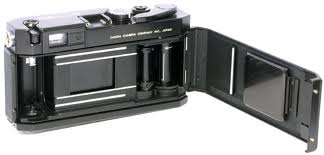
Remember you old school film camera, the film went in the back and there was the "soft spot" in the middle that you never wanted to put your fingers in... and most of you did anyways. This is your shutter... here is what it looks like close up.

The shutter sits between your lens, and your film... or your sensor chip these days. It moves out of the way opening to expose the sensor to your scene and thus creating your image. How long that shutter stays open has a direct effect on exposure of your image. I like to think of the shutter as the eyelid of your camera... if the aperture is the iris that moves larger or smaller to allow more or less light in, the shutter controls HOW LONG the light comes in... and the sensor would be the brain capturing the image. As we know from previous lessons 3 things control your exposure. (How MUCH light, How LONG your sensor is allowed to see that light, and How SENSITIVE your sensor is to that light)


So, why would you want to control the amount of time your camera sees a scene? 
Have you ever taken an image of someone waving? Was their hand blurry or clear? This has everything to do with your shutter speed.

TIP: Shutter speed is measured in seconds – or in most cases fractions of seconds. The bigger the denominator the faster the speed (ie 1/1000 is much faster than 1/100).
A shutter speed of 1/100th of a second is better for shooting HIGH speed, such as action, sports, waving hands... because it stops the action.. it is open for such a small amount of time that it appears you have frozen the movement.Where if you take the same image with a shutter speed of 1/100 it could still appear blurry.
Shutter Priority setting 1/100
 Here is my fan this morning... as you can tell the blades are moving along at a pretty good clip, seeing as how its already above 80 and its not quite 7am yet.

Note: The yellow is due to not using a flash. The light available from the ceiling fan is simply producing the yellow light, I choose not to WB or adjust anything else so we would have a baseline image as we move forward.

Shutter Priority setting 1/1000

Now it looks like the fan is turned off, right? It's not! My shutter simple opened and closed so fast that it "froze" that action.

So when would you use Shutter Priority?

When you want to stop action... such as sports, cars moving, babies moving, birds in flight, butterfly or humming bird wings... these are all calling out for a high shutter speed.


When you want to SHOW movement. Crazy idea, right? But think about it... what is the most beautiful image of a waterfall? The one where its all blending together and looks magically smooth... That's done by blurring the motion, leaving the shutter open for a longer amount of time. What about shooting your holiday photos? What if you want to show that the hummingbird was really flying when you took the image? You want it to be clear, but the wings to show motion. It helps to tell your story.

Now, this is where things get tricky... the longer you leave the shutter open the more things can go wrong for you. Even if you can hold your hands steady, you might pick up what is called motion blur or camera shake, from you breathing or moving the camera ever so slightly. The solution. TRIPOD or MONOPOD. If you plan on doing long shutter photography, like night skys, lighting or even holiday lights, putting your camera on a steady surface and not touching it is your friend!

With the 4th of July coming up.... I bet you know why this was on my mind! FIREWORKS, Baby! Controlling your shutter means you can show the movement in the fall! But remember, a TRIPOD needs to be used so you don't blur the image by holding your camera!

Happy 4th and Happy Shooting!!!!

Tuesday, May 7, 2013

Tuesday Tip: The DIS Function

What is DIS: Digital Image Stabilization. This is an Olympus function found on Olympus cameras, however most digital point and shoot cameras have some version of this regardless of brand.

Basically this function increases your ISO settings in order for your chip to gain more information with less available light.

NOTE: This is a DIGITAL function done on the CHIP / processor of your camera. NOT in the lens of your camera.

This function should not be compared to, or confused with the Cannon (OPTICAL) IS, or Nikon VR (Vibration reduction) or any other LENS term. It functions, acts and has a completely different effect on your images!

I first came across a client who had been doing her own product photography and had to ask what she was taking images with that was causing them to be so grainy (ok yes, digital people grainy is a film term for the "digital noise" you get on the chip.. I'm from the old school of film.. it shows sometimes).
She told me the camera that she was using... and I had to probe a little more... no way that camera was in the right mode and kicking out these images! She told me that she used the DIS mode, because someone said it would keep her images from being blurry.

OH STOP THE PRESS! 

I mean... SHUT THE FRONT DOOR (see I can be hip, lol

They said WHAT!? 

No no... let me tell you what really goes on. 

The elements of an exposure:
Your camera is like your head, right?
The eyelid is your shutter it "blinks" or opens and closes to control HOW LONG the "frame" or image is exposed for.
Your iris is your Aputure: it dilates or contracts allowing for HOW MUCH light will be let in.
The Brain is like the chip. It has to decipher the code. You can also set the SENSITIVITY of the chip (ISO) so it can "remember" or "capture" more information.

Note: These 3 things control your exposure. FOCUS is controlled by your LENS.

Which is what this "DIGITAL" IS mode is doing. It is increasing the sensitivity to light so your camera can capture more information.  This however, does come at a price. Just like in film days.. when you had to learn the differences in film speed... its the SAME concept.... they didn't even change the term when they made it digital! Lucky us!

So remember your film speeds... 100 - for BRIGHT sun, then you increased the speed according to each lower light, or faster action that you planned on shooting.... so 800 was good for inside low light, or sports... but when you got it printed it looked green and had little dots all over it, and it looked worse the larger you printed them? That was the FILM grain. Because in order to make film more sensitive to light they made the pieces that the light reflected off of (the grain) larger... so you saw it when you printed it... because you basically put it under a microscope to make a 4x6 version.

Ok... so how does this history lesson apply... take everything I just said, and change the word film, with digital... and grain with noise.

Instead of the pieces physically increasing in size they become more "sensitive" to light electronically... but the result is the same, only with better color balance. You see spots on the image which make it appear MORE broken and that "could" be described as blurry... but its not, its noisy because your seeing the pixels braking down in the image. sensitivity was turned up.  If your sensitivity is turned up, things don't look clear... so don't do it when you need quality clear images!

Now.... DIS has its place, just like 800 speed film... and that place is LOW light NO flash venues... like concerts, parties... things like that. Places where you need it to be more sensitive, because of the low light, no flash, and no tripod... but your not trying to sell an item, your trying to capture a moment.  It's like.. the last resort option to get any sort of workable image.

NOT for product photography.

If your images are blurry from camera shake (which is the most likely suspect, and the reason this  DIS mode would have been suggested at all) during your product photography sessions- you have WAY to little light on it! Instead of adjusting by controlling your ISO, which may increase the sensitivity, but adds grain/noise to your image, consider shooting during the day, or outside, or with a tripod so you can leave your shutter open longer, adjust your shutter speed, or aperture... or in just about any way...INCREASE your light... or QUALITY of light. This means less grain / noise and less distractions to your image.

I am happy to report, that my client took my advice and now even the images she has to do herself are turning out more clearly and with some practice and other tips her backgrounds are getting more and more white - and the focus is become more and more on her products! I LOVE that she continues to improve and her shop is better for it!

If you are stumped by a photography situation, want me to troubleshoot and tell you what is going on or how you can take better images - Please just ask! I love to see you succeed!